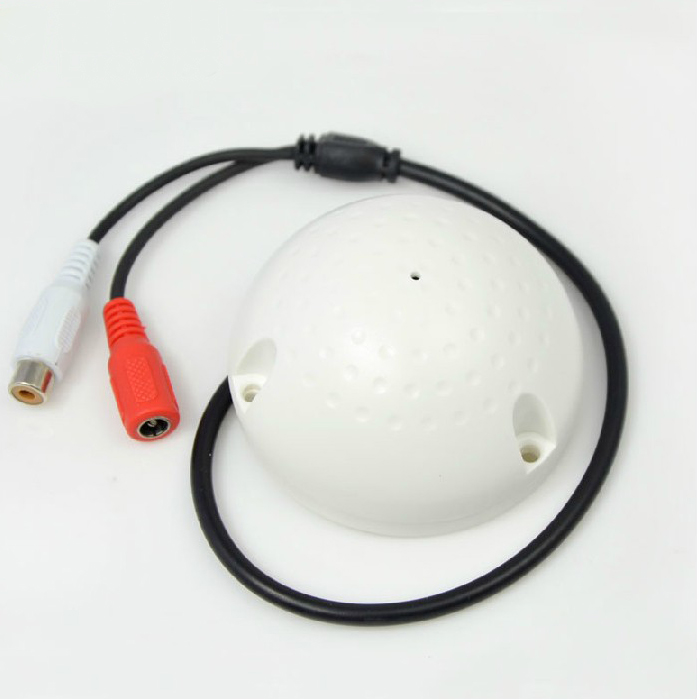
A professional grade product designed specifically for use with surveillance, anti-theft alarm and other security systems, suitable for monitoring and recording within a normal range, with a monitoring range of 10-150 square meters,The built-in potentiometer can adjust sensitivity.

Unique high sensitivity, low noise, low distortion, small size, wide working voltage range, built-in power reverse protection circuit, low power consumption, long transmission distance, simple and convenient connection, can be widely monitored, and suitable for concealed and exposed installation. It can be widely used in banks, finance, shopping malls, prisons, judicial courts, examination rooms, conference rooms, industrial production, military heavy land, and other places. The audio collector (microphone) can also be connected to a wireless repeater and applied to highway toll stations, etc.
§High fidelity and low-noise processing chip
§Advanced microphone suppresses environmental noise
§Adjustable sensitivity of hemispherical shell
§Meeting rooms and halls are commonly used
§Built in noise reduction processing circuit
§Power polarity protection circuit
10-100 square meters
Impedance 600 ohms
Frequency range of 200~10Khz
Power supply 9~14VDC
Size Φ 72 * 41mm
Suitable for DVR devices such as Hikvision and Dahua
Introduction to microphone:
What is a microphone? It is a pickup accessory used for synchronous recording and video monitoring. Simply put, the camera is the eye, and the microphone is the ear. Hard disk recorders are responsible for storing sound and images, while monitors and speakers are used for playback.
Is a microphone a microphone? Not entirely correct. The microphone not only includes a high-sensitivity microphone, but also integrates a preamplifier circuit. Therefore, the microphone can be directly connected to DVR, active speakers, headphones, sound cards, etc., while the microphone also needs to be connected to an amplifier. In addition, regular microphones are usually directional and low sensitivity, and only need to be aimed at speaking at a very close distance. In order to pick up sound further, most pickups are designed to be highly sensitive, directionless, or omnidirectional.
高保真拾音器,White small hemisphere shape, power and signal leads need to be connected to the pickup by themselves, with sensitivity adjustment (after opening), stronger adaptability, and self provided screws for fixed installation. Suitable for most occasions, effective monitoring range: 30-60 square meters in quiet places, 10-20 square meters in ordinary environments Working voltage: DC 6V-12V 12MA Frequency range: 300Hz-5kHz 2.5db Output impedance: 600 ohms 0-6V Appearance: Diameter 69MM Height 39MM
Install the microphone
1. Selection of installation location for microphone
The microphone can be installed on the ceiling or hung on the side of the wall. The installation location should be as close as possible to the main conversation area. For example, the interrogation room can be installed near the person being interrogated; The classroom can be installed near the podium; Small meeting rooms can be installed in the center of the ceiling. Installation principle: Try to be as close as possible to the main conversation area for better sound pickup effect.
2. Selection and wiring of microphone connection cables
The technical specifications of the microphone connection cable are not high, and ordinary shielded signal cables can be used, or twisted pair transmitters can be used in conjunction with ordinary Category 5e network cables for transmission. The power supply for the microphone generally adopts a remote centralized power supply method (i.e. centralized power supply at the audio recording equipment end/amplification equipment end). Note that it is best to wire separately when wiring, and do not use the same cable tray as strong AC electricity. At the same time, try to stay away from strong electromagnetic interference equipment such as transformers and lighting rectifiers.
3. Power selection and connection
The power supply method for the microphone requires remote centralized power supply (i.e. centralized power supply at the audio recording equipment/amplification equipment end). This series of microphones can use a wide range of 8V-20V DC regulated power supply, and DC12V is recommended. If the power cord is greater than 500 meters, voltage drop may occur due to line loss. It is recommended to use a 15V-20V DC stabilized power supply. Due to the fact that pickups are highly sensitive small signal amplification devices, they are sensitive to power supply noise. Therefore, it is essential to use a clean and high-quality DC stabilized power supply with low noise. The current consumed by a single microphone is approximately 10-30mA, which means that a DC regulated power supply with a nominal value of 1 ampere can supply at least 10 microphones to work simultaneously. In applications, power efficiency and line loss issues should be considered, and power sources with higher nominal values should be selected as much as possible. The DC stabilized power supply referred to here is commonly known as a "transformer", which is generally composed of a power transformer, rectifier diode, filtering capacitor, and integrated voltage regulator. Under normal circumstances, it is not suitable to use a switch mode power supply as it may introduce a large amount of circuit noise to the microphone! What is a switch power supply? Simply put, it is a switch type DC stabilized power supply, which is an automatic stabilized power supply composed of electronic switch tubes and electronic switch oscillators. For example, a regular desktop computer power supply is a switch power supply.
4. Common ground connection of power negative pole and audio ground wire
The audio ground wire of the microphone and the negative pole of the power supply must be combined and connected to both the negative pole of the DC stabilized power supply and the ground wire of the audio input terminal (Line In) of the audio equipment. If the power ground and audio ground are not well connected, it can lead to a decrease in sound quality or no sound. If the ground of the Line In terminal of the audio device is not connected to the ground wire of the microphone, the sound will generally be very low.
5. Connection of audio cable
Devices that can be directly connected to audio signal lines and audio ground lines: Line In linear input terminals for listening headphones, active speakers, audio amplifiers, audio and video distributors, DVR hard disk recorders, video servers, mixing consoles, recorders, sound cards, or other audio devices (microphone interfaces are strictly prohibited).
Connect the hard disk recorder:Most hard disk recorders have corresponding audio input ports, usually using coaxial cable BNC plugs. The audio cable of the microphone needs to be connected to the center pin position of the BNC plug, and the microphone public needs to be connected to the outer shell of the BNC plug (i.e. the shielded copper mesh connected to the coaxial cable). 2. Active speakers with built-in amplifiers. A complete set of ordinary active speakers usually consists of two on each side, corresponding to the left and right channels of the audio cable. This microphone only provides one audio source, so it is a "mono" audio source. The audio cable of the pickup is connected to the left/right channel audio cable of the speaker cable, and the common ground of the pickup is connected to the ground wire of the speaker cable. 3. The connection method for other audio devices such as amplifiers and mixing consoles is the same as the above method. 4. It is strictly prohibited to connect the microphone (MIC) input of devices such as sound cards, mixing consoles, amplifiers, etc., as it may damage the equipment. This is because although the microphone is also included inside the microphone, it also includes circuits for amplification, noise reduction, echo processing, etc., outputting a "Line Out" audio signal of 1Vpp or more. 5. Laptops are rarely equipped with a "Line In" audio input jack, usually only equipped with a MIC input jack and an SPEAKER output jack. The microphone cannot be directly connected to the MI C port, only a professional external USB interface desktop sound card can be purchased, and the "Line In" port can be used to connect it. 6. The audio cable of the microphone cannot be directly connected to two types of audio devices. It must be connected to a microphone adapter to avoid possible deterioration in sound quality due to impedance mismatch. Attention: During all connection processes or when flipping the switch, adjust the volume of your amplifier device to the minimum to avoid momentary electrical shock.
6. Microphone sound gain (volume size) adjustment
Attention must be paid: If the amplitude of the sound output from the microphone is too large, it can cause sound blockage and deterioration of the sound quality of backend audio devices such as hard disk recorders and speakers. Please adjust to an appropriate level.